
Machineboy空
[Ableton] 1.12 Audio Effects - Filters & Spectrums 본문
Filter = 많이 쓰이는 효과
- lovely audio effect on top of your sounds
- tool for removing unwanted parts of sounds
Clipping과 Level Meter의 Head room 확보하기!
Main Channel(= Master Channel) = each of your individual tracks combines before it comes out the speaker
스피커로 출력되기 전 컴바인
Level Meter에 a little bit of space at the top below white line.
white line = the loudest that anything can go before it distorts 이걸 넘어서는 것을 Clipping이라고 한다.
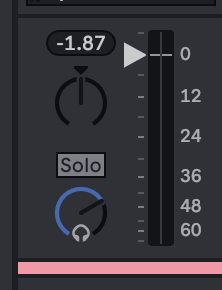
Main 채널에 Grain Delay 걸기

Main 채널에 Auto Filter 걸기
- low frequency : bassy sounds, deep sound = left side
- high frequency: right side
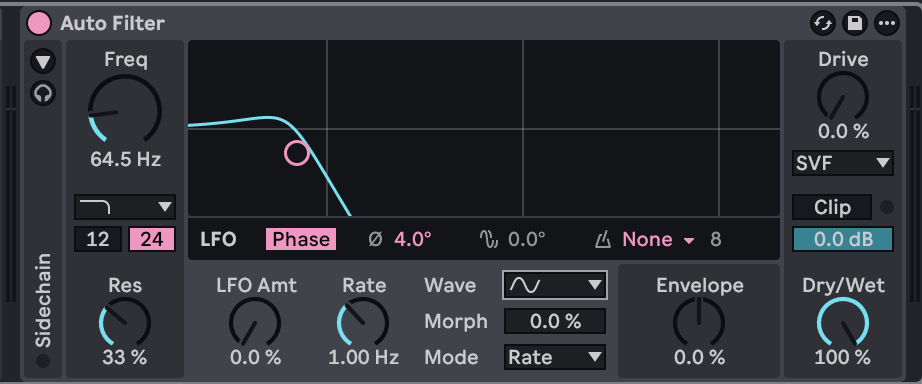
Low Pass Filter
walls in your bedroom = good low pass filter
저음은 통과시키고 고음은 반사시키는 소재
그래서 쿵쿵 울리는 저음은 잘 들리는데, 고음은 안들림
클럽 밖에서 둥둥 저음만 들리는 이유가 이것
High Pass Filter
디제이들이 좋아하는 효과
filter sweep technique 하이패스로 한번 올렸다가 베이스 드롭 넣는 느낌
'#endregion > 사운드' 카테고리의 다른 글
| [Ableton] 1.14 Audio Effects - Further FX (0) | 2025.11.18 |
|---|---|
| [Ableton] 1.13 Audio Effects - Modulating Effects (0) | 2025.11.18 |
| [Ableton] 1.11 Audio Effects - Delay, Reverb (0) | 2025.11.18 |
| [Ableton] 1.10 Scenes (0) | 2025.11.18 |
| [Ableton] 1.9 Clip Anatomy (0) | 2025.11.18 |
'#endregion/사운드' Related Articles
more


